GitHub Actions: using Claude Code to update NuGet Packages


Overview
Updating NuGet packages is not the funniest thing we do, but it's important to keep the code relatively clean and up-to-date. Most people use some tool like Renovate for this. Renovate is very good and does the job well, but I thought it would be just fun to try to do the same with Claude instead!
What I've set up is a simple but fun combination of a Claude Code command and a GitHub Actions workflow that together open a pull request with updated packages — automatically. As a bonus (I personally see a great benefit here!), we can get code changes and breaking changes handled too.
The Claude Code Command
A Claude Code command is essentially a prompt stored as a file at <repository>/.claude/commands/your-command.md. By only storing a single markdown file there you invoke it inside Claude by typing /your-command , and Claude executes it.
The command I wrote tells Claude to:
- Find all NuGet packages in the solution
- Update them to their latest versions
- Skip specific packages — for example, I exclude Fluent Assertions because it recently moved to a paid license model
- Compiles and run the tests to verify all works
- Open a pull request with the changes
The command itself is quite long so I don't include it here, but you can copy-paste my command if you'd like or get inspiration from, I've published it as a GitHub Gist here.
That's almost all we need Claude-wise.
Installing Claude Code in GitHub
In order to run Claude inside GitHub you need a token. To install this you start Claude and then type /install-github-app. This will install the OAuth token so you can reference that from the workflow which we'll see soon.
Now the last thing is to wire up things together, i.e., creating the GitHub Action.
The GitHub Actions Workflow
If you haven't written GitHub Actions workflows before, they can feel a bit tricky at first. Claude can help write them of course, but I've had mixed results with that. Not everything was done very well and I had to iterate a few times. But a GitHub Action is basically just a yml file with a set of instructions or script that will run in order. I run it on a weekly schedule, every Sunday.
Here's roughly what the action does:
- Checks out and sets up the repository
- Installs dependencies — in my case this includes .NET and Docker, since I run integration tests using TestContainers. This step is optional and depends on your stack.
- Invokes the Claude Code Action — You pass it two things: your Anthropic API token (which we installed previously) and the prompt, which is just the slash command name we saw earlier.
- Configures additional arguments, which is the most important and tricky part:
max_turns— a turn is roughly one discrete action Claude takes (reading a file, writing a file, running a command would be 3 turns I think). Set this high enough that Claude can finish the job.model— I use Opus for this.allowed_tools— critical. If you don't give Claude permission to edit and write files, nothing will happen. You also need to allow the .NET CLI tools so it can actually rundotnetcommands.
You can copy-paste my entire GitHub Action if you'd like or get inspiration from, I've published it as a GitHub Gist here. But if you don't want it all, here's just the Claude Code parts of it:
- name: Run Claude Code to Update NuGet Packages
  uses: anthropics/claude-code-action@v1
  with:
    show_full_output: true
    claude_code_oauth_token: ${{ secrets.CLAUDE_CODE_OAUTH_TOKEN }}

    # Execute the nugetupdate slash command
    prompt: /nugetupdate

    # Allow required tools for package updates
    claude_args: |
      --model "opus"
      --max-turns 200
      --allowed-tools WebFetch,WebSearch,Read,Edit,Write,Glob,Grep,Bash(dotnet:*),Bash(git:*),Bash(gh:*),Bash(date:*),Bash(docker:*)
The end result is a pull request created automatically with all the package updates applied and tests passing:
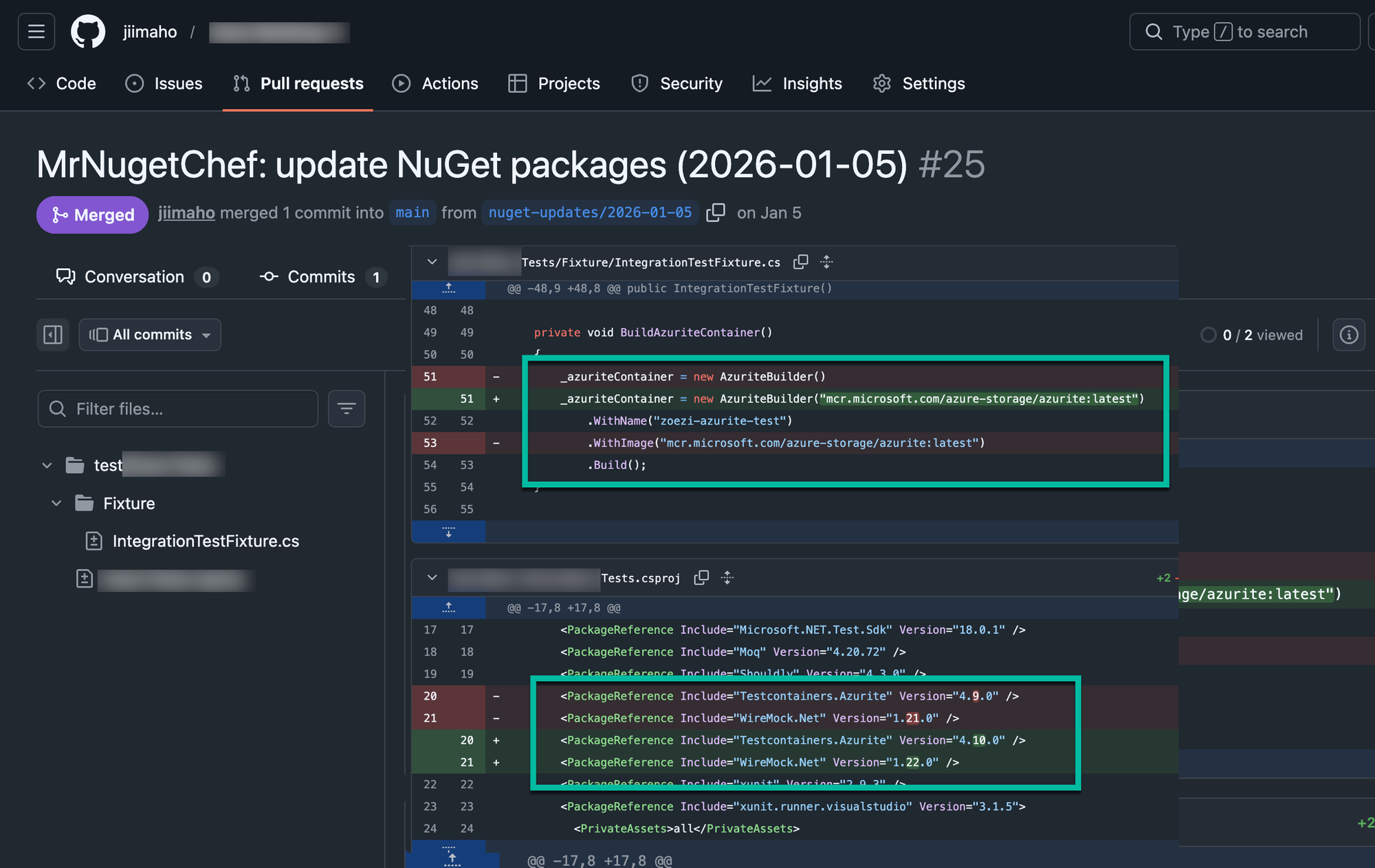
And do note this is not just a regular package update, it's also a real code change. Because WithImage above is obsolete, Claude decided to change that and use the constructor of AzuriteBuilder instead, which is now recommended. This is very neat! I see a very natural path here to eventually let Claude handle way bigger breaking changes, something that would take even an experienced developer at least a few hours if not a day, depending on what breaking change it is.
Summary
This is a small thing but was very fun to set up. Now I need to think less about package updates and let Claude handle that. Both the workflow file and the Claude Code command are available as public GitHub Gists: