From zero to Claude Code
How I went from the beginning of ChatGPT till using Claude Code on a daily basis for most tasks.


Introduction
This post is about my journey from the beginning of ChatGPT till Claude Code that I use today, and how I got here.
ChatGPT was released on November 30th 2022. What has actually changed since then? That's almost exactly 3 years ago.
I'm not that much into AI really. I've never played much with it on my spare time, had any specific interest in it or so (until now), but based on what I know today it's obvious you can't ignore it anymore. I was asked to try it out by my employer and boy do i like it!
Even though AI has been around for a couple of years, it's only now during 2025 things have started to explode in terms of usability and value that these tools give us. It feels like the last couple of months the tools have become so much more useful compared to what happened between 2022 and 2024. It's almost like I have forgotten how I used ChatGPT just a few months back to how I use Claude Code today.
If you're an expert or very frequent user of AI tools you won't benefit much from this post (apart of maybe just having a relaxed read or so). But if you're new to it, feel you're missing out or starting to have AI anxiety, then this post can be helpful to read.
Death of Google, start of Manual ChatGPT
ChatGPT desktop was the first thing I used. I loved it and how it worked. I could ask questions about how things in C# worked for example and sometimes i got really really great answers and sometimes not. Google, one of the most powerful search engines out there pretty much "died" for me just over a day. I searched with ChatGPT for nearly every problem I had and it was fun. Whenever I needed code from ChatGPT, copy-paste was my friend.
At the same time I also used Github Copilot in my IDE. I really loved that too, and it helped to write boring code and just let me press <tab> a couple of times and there was the code. Although Github Copilot hasn't changed much for me, I still have it and use it.
Being a .NET developer on MacOS I just used JetBrains Rider and ChatGPT desktop client to ask questions and copy-paste code and get inspiration of how to solve problems.
That era for me was pretty long to be honest. Since the release of ChatGPT till May-ish 2025, I only used Rider (with Copilot) and ChatGPT desktop client.
My early take on Claude Desktop
In around February 2025 I heard people talk about Claude Code and Anthropic and didn't care that much about it. Different AI models, another company, "traditional" evolution of the competing market. After some time i was like "meeh, sure lets give Claude a chance". At this time I just installed and used Claude desktop but hey, it was nice! I remember i felt like "alright, this feels like ChatGPT but much better and the code examples produced by Claude desktop is displayed way better and nicer. Since that day I cancelled my ChatGPT subscription and subscribed to Claude instead. I liked Claude desktop so much more.
I got familiar with Claude desktop and used that quite a while, but I just did the basics of asking questions and got some answers. This was all in the desktop client. Sure it was good, but I always had to jump back and forth between the code editor in my case and Claude desktop.
AI anxiety
During summer 2025 I had my first personal era of AI anxiety. I didn't enjoy AI very much nor use it. And I could feel it. If you don't have any personal interest in it, it's hard to learn it. I have a lot of respect for people that are afraid of that AI will take their jobs in the future. It's a very reasonable feeling considering where we are now. But personally, I was not afraid back then nor am I now. But I did feel I was missing out.
I felt I need to "buckle up". I need to start learn it. On a personal level i've always felt that it's important to keep a "junior mindset" or so. To keep learning. But I did not. Thanks to my employer that changed dramatically in August 2025.
Start of the change
The big change happened when my employer asked me and a couple of other colleagues to really give Claude Code a chance for two months and get good at it. I installed Claude Code (at this point I completely left both ChatGPT GUI and Claude desktop) and started with some basics in the terminal with Claude Code.
One thing i realised here is that the tooling you use as a developer has quite a lot to do with feelings. Claude Code is a tool that you use in the terminal, and the output from Claude was not always great. I wrote a few prompts, used some code from Claude Code and asked a question or two. Claude was cool but not at all my primary source of trust or comfort.
Accepting change and the emotions that comes with it
In terms of getting things done and delivering value in my team, I did realise that i was a bit slower than usually with Claude, but i also said to myself:
Not feeling comfortable from day one is probably part of the learning curve, but if i continue invest time, then that might very soon give me a huge improvement in productivity.
I continued and the amount of trust or feeling of control for me increased. Claude still wrote the code, but i learned more and more in what way Claude typically presents the solution, how Claude came to the conclusion and what was bad and what was good. So I said to myself:
This is probably a good time to take things slower.
Early days of Claude Code for me
Prompt
It was early days and my prompting were limited, and could look something like this:
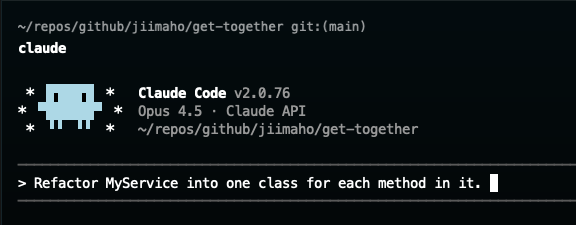
I often focused on very technical things because I thought that's what the model needed to perform. It wasn't bad, really. It still gave me quite impressive code. Sure the code could use old syntax or so, but I kept refine it and write more prompts. I thought that was "the" way of using it. Boy was I wrong.
So far it was mostly C# code that i wrote, but i did see great opportunities with other areas as well, integrations to Github issues being one of them. I read the fantastic post by Anthropic about best practices with claude and started implement them one by one: https://www.anthropic.com/engineering/claude-code-best-practices. That post is "old" now, but most of it in there is still true today as of end of 2025.
Last thing to say here in my early days of Claude Code regarding prompts, I hated the idea of writing prompts. My mindset was very firm:
If I have to write a prompt consisting of 3-6 sentences (yikes! it's a small book for god sake!), then I might as well write the entire code myself.
That kind of toxic attitude is not very helpful, as we'll see later.
Context
At this time I did not know much about CLAUDE.md, what context is, why you need to reset/restart the context before each new assignment. It all still worked, but one big problem I felt repeatedly is that when writing tests for example, Claude continuously changed naming from Should_Do_Something to Give_When_Then to ShouldDoSomethingTogether. This was rather frustrating and time-consuming to fix.
Behaviour
I did not use any additional behaviour (MCP) at this time. This made the suggestions in terms of code quality low, and the "flexibility" limited. Claude did not know how to lookup Github issues, research fresh and modern source code, talk to my database etc.
Understanding the importance of context
Imagine you talk to a friend and have a conversation about the history of Rome for 50 minutes. All of a sudden you ask your friend this question:
From where do a tomato really gets its taste?
Your friend will look at you with a question on her face. What do you mean? Or I mean, what do this have to do with Rome?
The good thing with your friend is that your friend will halt the discussion. Your friend will make sure you're now switching contexts to a very different topic and then answer your question. And at the time of writing this post, AI agents do not do this, so agents will just give you an answer within 1 sec which is good or bad. We must manually tell the AI to reset context before we send the new question or statement.
Understanding this is key, and VERY important. This is also the reason why people always makes sure the model get a clear perspective and resets the context. Exactly how people do this probably differs slightly depending on their workflow, but I typically do this:
- Ctrl+c twice to exit
- Enter: claude "Read @CLAUDE.md"
The reason why I explicitly tell claude to read CLAUDE.md on startup is because it has been bugs previously that claude ignored it. In the future this likely won't be needed. The good thing is that once I have finished that "context reset" then claude has a fresh mind of the code base again and is ready to tackle the new problem.
Trying Claude commands
We do work with Github issues but I did not use AI tools to work with them. However I got a tip that Claude was very good at using the Github CLI itself to work with. I installed the Github CLI and Claude would very soon help me create issues.
Soon enough I realised that "Hmm, if I just happen to sit in a meeting taking notes, but spend slightly more time writing a user story instead following the Given When Then style, could I use Claude to create the issue out of the meeting notes themselves? And sure Claude could! And then, whenever I picked the story, could I use the story as a foundation for Claude to implement it? "Implement the story XYZ". Since I don't have much meetings (fortunately) at my job this wasn't a very scalable or helpful thing, but it was something else: a very pragmatic and practical approach for me to start explore the use of AI tools outside of just pure coding.
And that was golden. I started explore commands with Claude and created two, one /github-create-issue for registering a story and one /github-create-bug for bugs. I have used them roughly speaking 20 times so far, so not that much, but it's good to explore different paths to make the job better or so.
Extending Claude's behaviours - Akka.NET example
The model itself is very good, but learning how to use extended behaviours (known as MCPs) is extremely good.
My favourite so far is using a MCP that allows the model to talk to a Postgres database. In my team we were using Akka.NET which is an actor system quite popular in the .NET ecosystem. One of the harder areas with Akka.NET (and many other frameworks too) is to understand serialization of stored messages. In C# for example, if you move a class or record to a new namespace then that might cause runtime exceptions because you stored My.Name.Space.Class in the database but now it tries to deserialize it using My.Other.Name.Space.Class throwing an exception during runtime.
This is very frustrating, and you need to really know what you're doing before modifying these things. Fortunately Akka.NET lets you customize the serialization, but you just need to know what and where to do that, and make sure you've done it using the correct approach.
Akka.NET stores state as base64 encoded JSON so it's messy to read, decode, compare etc all the time.
This was one of the times where Claude (or rather MCP) blew my mind. I had done all code changes necessary and was pretty sure I did the right thing. Then I asked my self:
Wait a second, if I enable that MCP for Postgres I found the other day, can i just double check my code changes with Claude and let Claude verify if my theory or understanding is correct regarding the code in conjunction with how Akka.NET really stores the data.
And sure Claude could! With the help of an MCP! My prompt to Claude was something like:
The goal is to make sure serialization works with Akka.NET regarding how it's stored in Postgres. You need to verify that my code works according to how the state is persisted in the journal table that Akka.NET uses. It is very important that this works because otherwise we'll get runtime errors.
Indeed I could see Claude calling the MCP tool, searching and finding the tables related to Akka.NET, selecting from the journal table, looking through all the columns and found the one with the data, looked at it and realized it looked like base64 so he decoded it, confirmed that the JSON had an embedded $type parameter that had the old namespace name. For me, this was insane, really. It was one of the moments where I felt holy fu*k AI is here to stay.
Claude Code now
This is how I typically use Claude Code today. Of course that might change soon, but at the same time I do believe prompting, context and behaviours in one way or another will stay relevant for a bunch of the upcoming months.
Prompt

That's a prompt I did yesterday to setup a new project (I did close to an identical prompt when building this other app called get-together-group.com that I reference in the prompt). There's a few things I intentionally skipped, and a few things I did on purpose:
Dont's:
- One-liner because i'm lazy
- Started with a pure "setup boilerplate repository"
- No nitty gritty detail about code
- Mention DNS because I know i'll have to do that manually for now
Do's
- Focus on my goal
- Explicitly say I need a web application and not something else
- Mention functionality needed
- Mention Google account and log in because I know Claude can handle that directly.
- Mention browser expectation because I know that'll be missed otherwise
- Reference another project because I know that will greatly help Claude get inspiration of how I want the code to look.
- Include a few sentences because the extra time it takes to write them means I get closer to one-shotting the feature, hence saving time having to write fix-prompts after.
Prompt code reference
One thing that has helped me so much regarding prompting is to give Claude inspiration. I've used Claude in codebases where the technology and structure of the code differs quite a lot, which gives Claude a pretty hard time. I mean, how would Claude possibly know our intention and preference going forward? The solution: give just a tiny snack of a reference of the code you like! No part of the code you like? Then write the first feature without AI if that floats your boat, and then write the features after with AI and reference the one you wrote manually.
So really, whatever my prompt previously were, I was hoping that Claude would output insanely good code all the time, but that never happened. So the picture below illustrates some part of the code that I did like. The structure of the code to create a user was according to our new vertical slice architecture, so if I - say for example - were to add a new endpoint to add a driver, coffee, gym or whatever, I literally speaking included this type of text to my prompt: "... The CreateUserEndpoint and CreateUserCommand is very good, take great inspiration from that code."
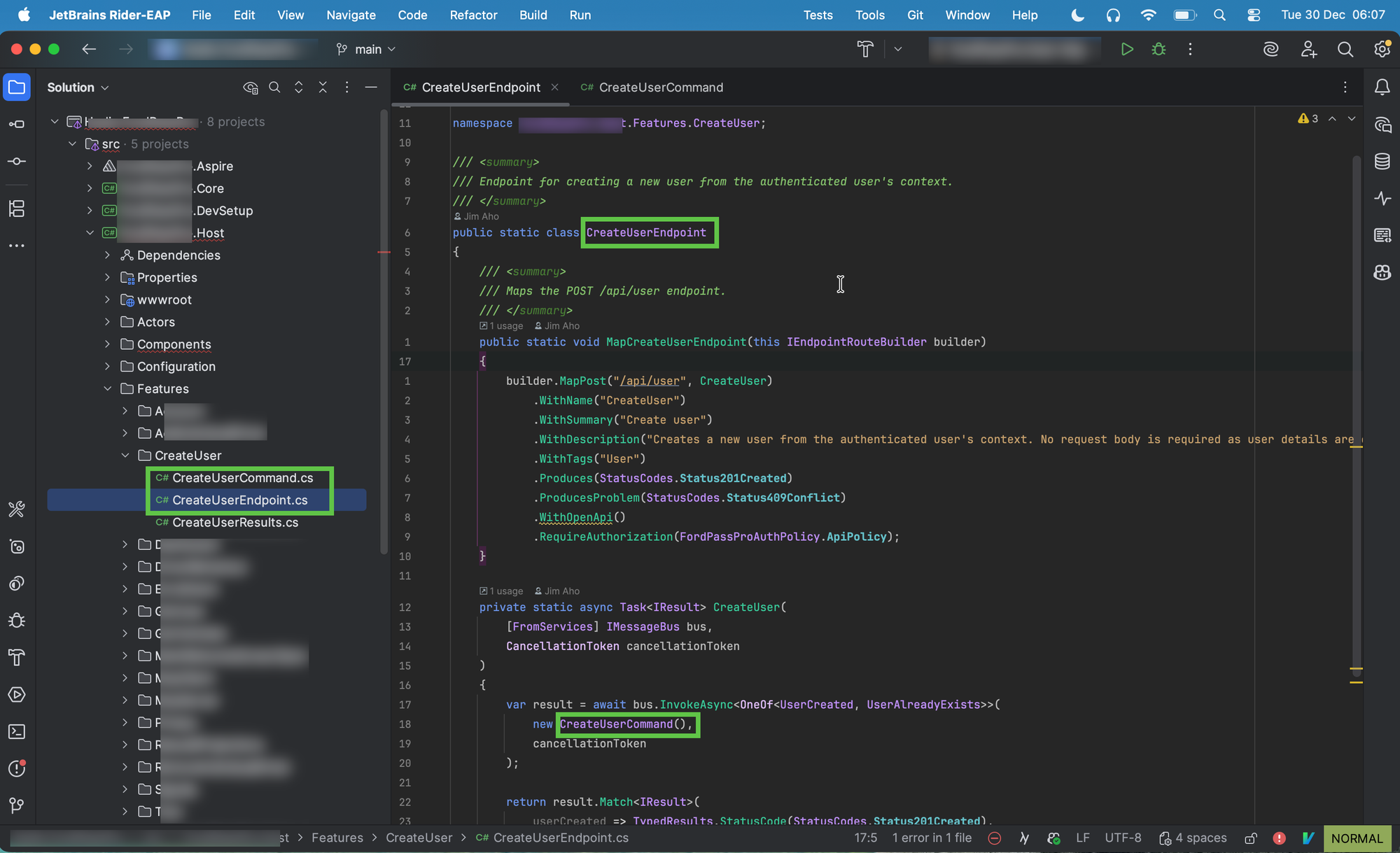
I won't show the result here because of verbosity. But yes! It finally happened and started to lose a bit... The idea of "AI is impossible to apply on codebases without a clean structure" finally diminished a bit. Now when including this type of sentence I explicitly told Claude how I want my solution, to be. It takes more effort, but it's worth it.
Context
Whenever a feature, functionality, fix or something else is updated, quite often before exiting or resetting the prompt, I tell Claude this "Please make an update of the CLAUDE.md file that <things> MUST always follow this convention".
And then for my new prompt, I continue with the usual business of:
claude "Read @CLAUDE.md"
The way you reset the context can probably be different depending on your terminal etc, but I typically just do a ctrl+c twice. My rule of thumb is to reset the context after each feature, bugfix, ci fix, or something else. I've learned to respect and honor the fact that Claude works best with a fresh mind for each new "thing" i'm about to do. So resetting the context and tell to re-read the CLAUDE.md makes Claude behave as if it's a new fresh day and we got all we need to do a good job. It does take another extra minute, ish. But it's worth it. A normal working day has 480 minutes, so wasting 20 of these or so to re-read CLAUDE.md works for me.
Behaviours
Currently i'm using an MCP for datadog to lookup logs, and see if Claude can find and fix bugs or weird behaviours. It's nice to play with, and sometimes very helpful.
I also use Postgres MCP. This one has been huge for me as seen previously when I explained about Akka.NET. Since we've used both MartenDB and Akka.NET in my project this MCP together with context7 has given me many good answers to my questions regarding serialization.
Context7 is very good to get better code-results, I recommend you try it AND inside your CLAUDE.md tell Claude to explicitly use it.
I don't have an MCP for Github but the Github CLI is still good and can be used by Claude.
Plan
Claude Code has a feature that you access by toggling with shift-tab twice . When in plan-mode no code will be written, but instead Claude will give you his plan of changes before making any. Learning to accept the emotional frustration of reading all this plan has saved me a bunch of future gotta-fix-this-and-that prompts because I got the plan good directly before implementing the code changes. I use plan mode for 95% of everything I do.
Model
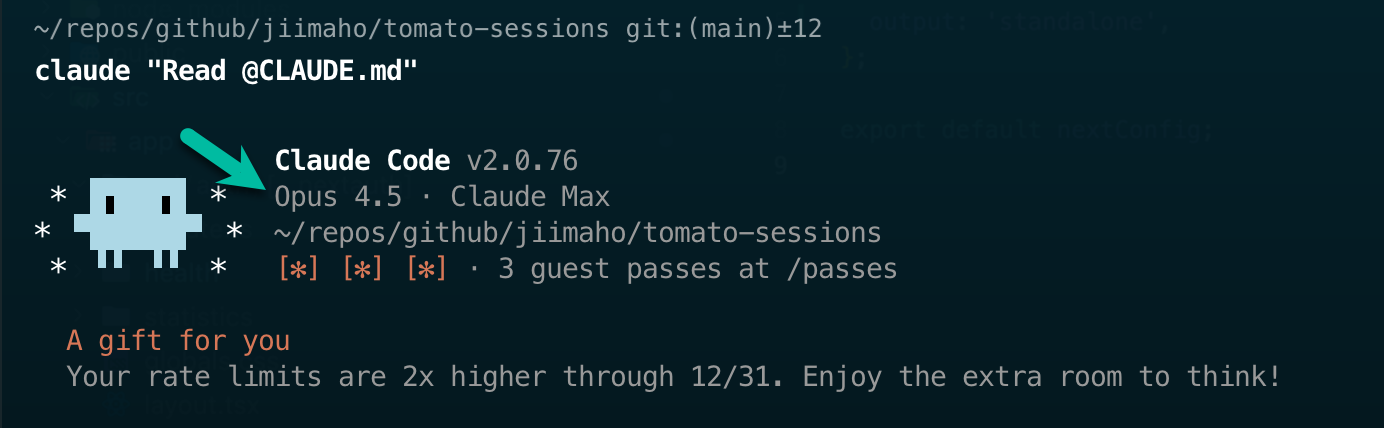
This is something I don't have to think about on a daily basis, but I feel I must say it. Claude Code is "just" the tool or interface, the model is the insanely talented brain that does all the magic. You must make sure you use the latest and best models. For Claude Code at the time of writing, use Opus 4.5. It's displayed differently over time but look for something like this when starting Claude Code:
Last words
There's so much more I could have added to this post, yet I feel like what I've written so far is a pretty good summary while keeping it reasonably short!
Some people do say that AI is simple, and to be honest I thought it was simple at first. But when you spend days, weeks and months with Claude Code or other tools you'll soon realize that to be efficient requires more effort than you think. It's easy to pop up ChatGPT at an afterwork and impressing someone that has never seen ChatGPT before. But to be productive with ChatGPT, Claude Code or Codex requires effort.
No matter our interest or personal preference, the only real thing that has stayed with me is this:
The only thing that's constant in the age of AI is that things will change.
To be an expert in all areas of AI or to use all tools out there all the time is something that won't be very healthy for me at least. It will be too much. So I'm trying to have a reasonable open mindset and use maybe one or two tools. Currently i'm trying Codex as well but no, I haven't played with the Gemini or other models. That might happen soon, who knows. But mainly using Claude Code has worked well for me so far.
Thanks for reading, and I hope you found one or two things at least helpful in this post 😊